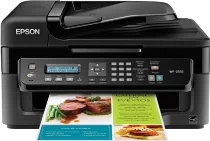
Pilotes Epson WorkForce WF-2532 pour Windows et macOS.
Systèmes d'exploitation Microsoft Windows pris en charge
Windows 11
Windows 10 (32-bit et 64-bit)
Windows 8.1 (32-bit et 64-bit)
Windows 8 (32-bit et 64-bit)
Windows 7 (32-bit et 64-bit)
Windows Vista (32-bit et 64-bit)
Systèmes d’exploitation pris en charge : Windows 11, Windows 10 32-bit et 64-bit, Windows 8.1 32-bit et 64-bit, Windows 8 32-bit et 64-bit, Windows 7 32-bit et 64-bit, Windows Vista 32-bit et 64-bit
Systèmes d’exploitation pris en charge : Windows 10 32-bit, Windows 8.1 32-bit, Windows 8 32-bit, Windows 7 32-bit, Windows Vista 32-bit
Systèmes d’exploitation pris en charge : Windows 11, Windows 10 64-bit, Windows 8.1 64-bit, Windows 8 64-bit, Windows 7 64-bit, Windows Vista 64-bit
Systèmes d’exploitation pris en charge : Windows 11, Windows 10 32-bit et 64-bit, Windows 8.1 32-bit et 64-bit, Windows 8 32-bit et 64-bit
Systèmes d’exploitation pris en charge : Windows 10 32-bit, Windows 8.1 32-bit, Windows 8 32-bit, Windows 7 32-bit, Windows Vista 32-bit
Systèmes d’exploitation pris en charge : Windows 11, Windows 10 64-bit, Windows 8.1 64-bit, Windows 8 64-bit, Windows 7 64-bit, Windows Vista 64-bit
Systèmes d'exploitation macOS pris en charge
macOS Sequoia 15
macOS Sonoma 14
macOS Ventura 13
macOS Monterey 12
macOS Big Sur 11
macOS Catalina 10.15
macOS Mojave 10.14
macOS High Sierra 10.13
macOS Sierra 10.12
OS X El Capitan 10.11
OS X Yosemite 10.10
OS X Mavericks 10.9
OS X Mountain Lion 10.8
Mac OS X Lion 10.7
Mac OS X Snow Leopard 10.6
Mac OS X Leopard 10.5
Systèmes d’exploitation pris en charge : Mac OS X Snow Leopard 10.6, Mac OS X Lion 10.7, OS X Mountain Lion 10.8, OS X Mavericks 10.9, OS X Yosemite 10.10, OS X El Capitan 10.11, macOS Sierra 10.12, macOS High Sierra 10.13, macOS Mojave 10.14, macOS Catalina 10.15, macOS Big Sur 11, macOS Monterey 12, macOS Ventura 13, macOS Sonoma 14, macOS Sequoia 15
Systèmes d’exploitation pris en charge : Mac OS X Snow Leopard 10.6, Mac OS X Lion 10.7, OS X Mountain Lion 10.8, OS X Mavericks 10.9, OS X Yosemite 10.10, OS X El Capitan 10.11, macOS Sierra 10.12, macOS High Sierra 10.13, macOS Mojave 10.14
Systèmes d’exploitation pris en charge : Mac OS X Leopard 10.5, Mac OS X Snow Leopard 10.6, Mac OS X Lion 10.7, OS X Mountain Lion 10.8, OS X Mavericks 10.9, OS X Yosemite 10.10, OS X El Capitan 10.11, macOS Sierra 10.12, macOS High Sierra 10.13, macOS Mojave 10.14, macOS Catalina 10.15, macOS Big Sur 11, macOS Monterey 12, macOS Ventura 13, macOS Sonoma 14, macOS Sequoia 15
Systèmes d’exploitation pris en charge : Mac OS X Snow Leopard 10.6, Mac OS X Lion 10.7, OS X Mountain Lion 10.8, OS X Mavericks 10.9, OS X Yosemite 10.10, OS X El Capitan 10.11, macOS Sierra 10.12, macOS High Sierra 10.13, macOS Mojave 10.14, macOS Catalina 10.15, macOS Big Sur 11, macOS Monterey 12, macOS Ventura 13, macOS Sonoma 14, macOS Sequoia 15
Spécifications de Epson WorkForce WF-2532
L'Epson WorkForce WF-2532 est une imprimante jet d'encre compacte et polyvalente destinée à un usage personnel ou à un petit bureau. Ce modèle repose sur une technologie à cartouches d'encre individuelles et intègre la technologie de tête d'impression Micro Piezo d'Epson. Il utilise quatre cartouches d'encre : noire, cyan, magenta et jaune. Il permet d'imprimer, de numériser, de copier et d'envoyer des fax avec un seul appareil.
La résolution d'impression maximale peut atteindre 5760 x 1440 dpi optimisés. Selon la norme ISO, la vitesse d'impression est d'environ 9 ppm en noir et 4.7 ppm en couleur. L'alimentation papier arrière accepte les formats courants de papier ordinaire et de papier photo. Cette imprimante permet notamment d'imprimer des factures, des travaux universitaires, des formulaires, des lettres et de simples images en couleur. L'impression recto verso nécessite une intervention manuelle, car l'imprimante n'est pas équipée d'un mécanisme d'impression recto verso automatique.
Les options de connexion comprennent des interfaces USB et Wi-Fi, qui permettent de connecter directement l'imprimante à des ordinateurs ou de partager l'impression sans fil. Elle permet également d'envoyer des fax, de numériser à l'aide d'un scanner à plat et d'utiliser un chargeur automatique de documents. Sa conception permet de placer l'imprimante sur un bureau, là où plusieurs fonctions bureautiques sont nécessaires. Ce modèle n'est pas conçu pour un volume d'impression élevé et ne dispose ni d'une interface Ethernet ni de l'impression recto verso automatique.