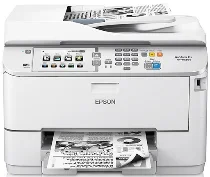
Logiciels et pilotes pour l’imprimante Epson WorkForce Pro WF-M5694 sous Windows et macOS.
Systèmes d'exploitation Microsoft Windows pris en charge
Windows 11
Windows 10 (32-bit et 64-bit)
Windows 8.1 (32-bit et 64-bit)
Windows 8 (32-bit et 64-bit)
Windows 7 (32-bit et 64-bit)
Windows Vista (32-bit et 64-bit)
Windows XP (32-bit et 64-bit)
Systèmes d’exploitation pris en charge : Windows 11, Windows 10 32-bit et 64-bit, Windows 8.1 32-bit et 64-bit, Windows 8 32-bit et 64-bit, Windows 7 32-bit et 64-bit, Windows Vista 32-bit et 64-bit
Ce programme d'installation du package de pilotes contient les éléments suivants :
- Pilote d'imprimante
- Pilote de scanner et utilitaire EPSON Scan
- Document Capture Pro
- Epson FAX Utility
- EPSON Scan OCR Component
- Epson Software Updater
Systèmes d’exploitation pris en charge : Windows XP 32-bit et 64-bit
Ce programme d'installation du package de pilotes contient les éléments suivants :
- Pilote d'imprimante
- Pilote de scanner et utilitaire EPSON Scan
- Document Capture Pro
- Epson FAX Utility
- EPSON Scan OCR Component
- Epson Software Updater
Systèmes d’exploitation pris en charge : Windows 11, Windows 10 32-bit et 64-bit, Windows 8.1 32-bit et 64-bit, Windows 8 32-bit et 64-bit, Windows 7 32-bit et 64-bit, Windows Vista 32-bit et 64-bit, Windows XP 32-bit et 64-bit
Systèmes d’exploitation pris en charge : Windows 10 32-bit, Windows 8.1 32-bit, Windows 8 32-bit, Windows 7 32-bit, Windows Vista 32-bit, Windows XP 32-bit
Systèmes d’exploitation pris en charge : Windows 11, Windows 10 64-bit, Windows 8.1 64-bit, Windows 8 64-bit, Windows 7 64-bit, Windows Vista 64-bit, Windows XP 64-bit
Systèmes d’exploitation pris en charge : Windows 10 32-bit, Windows 8.1 32-bit, Windows 8 32-bit, Windows 7 32-bit, Windows Vista 32-bit, Windows XP 32-bit
Systèmes d’exploitation pris en charge : Windows 11, Windows 10 64-bit, Windows 8.1 64-bit, Windows 8 64-bit, Windows 7 64-bit, Windows Vista 64-bit, Windows XP 64-bit
Systèmes d’exploitation pris en charge : Windows 11, Windows 10 64-bit, Windows 8.1 64-bit, Windows 8 64-bit, Windows 7 64-bit, Windows Vista 64-bit, Windows XP 64-bit
Systèmes d’exploitation pris en charge : Windows 10 32-bit, Windows 8.1 32-bit, Windows 8 32-bit, Windows 7 32-bit, Windows Vista 32-bit, Windows XP 32-bit
Systèmes d’exploitation pris en charge : Windows 10 64-bit, Windows 8.1 64-bit, Windows 8 64-bit, Windows 7 64-bit, Windows Vista 64-bit, Windows XP 64-bit
Systèmes d’exploitation pris en charge : Windows 10 32-bit, Windows 8.1 32-bit, Windows 8 32-bit, Windows 7 32-bit, Windows Vista 32-bit, Windows XP 32-bit
Systèmes d’exploitation pris en charge : Windows 10 64-bit, Windows 8.1 64-bit, Windows 8 64-bit, Windows 7 64-bit, Windows Vista 64-bit, Windows XP 64-bit
Systèmes d'exploitation macOS pris en charge
macOS Ventura 13
macOS Monterey 12
macOS Big Sur 11
macOS Catalina 10.15
macOS Mojave 10.14
macOS High Sierra 10.13
macOS Sierra 10.12
OS X El Capitan 10.11
OS X Yosemite 10.10
OS X Mavericks 10.9
OS X Mountain Lion 10.8
Mac OS X Lion 10.7
Mac OS X Snow Leopard 10.6
Mac OS X Leopard 10.5
Systèmes d’exploitation pris en charge : macOS Catalina 10.15, macOS Big Sur 11, macOS Monterey 12, macOS Ventura 13
Ce programme d'installation du package de pilotes contient les éléments suivants :
- Pilote d'imprimante
- Pilote de scanner ICA
- Document Capture
- Epson FAX Utility
- Epson Software Updater
Systèmes d’exploitation pris en charge : Mac OS X Lion 10.7, OS X Mountain Lion 10.8, OS X Mavericks 10.9, OS X Yosemite 10.10, OS X El Capitan 10.11, macOS Sierra 10.12, macOS High Sierra 10.13, macOS Mojave 10.14
Ce programme d'installation du package de pilotes contient les éléments suivants :
- Pilote d'imprimante
- Pilote de scanner ICA
- Document Capture
- Epson FAX Utility
- Epson Software Updater
Systèmes d’exploitation pris en charge : Mac OS X Snow Leopard 10.6, Mac OS X Lion 10.7, OS X Mountain Lion 10.8, OS X Mavericks 10.9, OS X Yosemite 10.10, OS X El Capitan 10.11, macOS Sierra 10.12, macOS High Sierra 10.13, macOS Mojave 10.14, macOS Catalina 10.15, macOS Big Sur 11, macOS Monterey 12
Systèmes d’exploitation pris en charge : macOS Catalina 10.15, macOS Big Sur 11, macOS Monterey 12, macOS Ventura 13
Systèmes d’exploitation pris en charge : Mac OS X Snow Leopard 10.6, Mac OS X Lion 10.7, OS X Mountain Lion 10.8, OS X Mavericks 10.9, OS X Yosemite 10.10, OS X El Capitan 10.11, macOS Sierra 10.12, macOS High Sierra 10.13, macOS Mojave 10.14, macOS Catalina 10.15, macOS Big Sur 11, macOS Monterey 12
Systèmes d’exploitation pris en charge : Mac OS X Snow Leopard 10.6, Mac OS X Lion 10.7, OS X Mountain Lion 10.8, OS X Mavericks 10.9, OS X Yosemite 10.10, OS X El Capitan 10.11, macOS Sierra 10.12, macOS High Sierra 10.13, macOS Mojave 10.14, macOS Catalina 10.15
Spécifications de Epson WorkForce Pro WF-M5694
L'Epson WorkForce Pro WF-M5694 est un modèle phare parmi les imprimantes spécialisées dans les documents noir et blanc. Elle vise à aider les entreprises à limiter leurs coûts tout en optimisant leur efficacité et leur productivité. Sa construction robuste témoigne de l'engagement de la marque en faveur d'un excellent rapport qualité-prix. Les cartouches d'encre offrent un rendement élevé, réduisant ainsi la fréquence de remplacement. Si vous souhaitez une imprimante avec fonctions recto verso, incluant l'impression couleur et noir et blanc, la numérisation, la copie et la télécopie, sans pour autant investir dans plusieurs appareils, alors cette imprimante est faite pour vous, à condition que l'impression monochrome vous ait convenu jusqu'à présent.
En matière de qualité d'impression, la WF-M5694 se distingue par son aspect professionnel et la netteté de ses textes noirs. La technologie PrecisionCore et la fonction FocusCOPY y contribuent, garantissant une mise en page claire et épurée. La rapidité d'impression est un autre atout majeur de cette machine. Il serait dommage pour un cadre de constater que son imprimante met du temps à produire ses documents. Avec une telle vitesse, vous serez toujours productif. Heureusement, cette gamme d'imprimantes imprime rapidement, aussi bien en couleur qu'en noir et blanc. Malgré ses excellentes performances et la qualité d'impression remarquable de la WF-M5694, le niveau sonore reste relativement faible, un avantage non négligeable au bureau.
La connectivité de la WF-M5694 ouvre un champ des possibles infini pour l'utilisateur. Elle permet d'imprimer depuis différents appareils dans un bureau moderne, comme Apple AirPrint, Google Cloud Print et NFC, renforçant ainsi la sécurité. Des modes de sécurité supplémentaires, tels que l'authentification par code PIN pour les tâches ou les utilisateurs, garantissent la confidentialité des informations non autorisées. Ainsi, la WF-M5694 s'impose comme une imprimante monochrome performante, idéale pour les environnements professionnels exigeants.