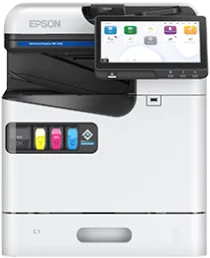
Pilotes Epson WorkForce Enterprise AM-C400 pour Windows et macOS.
Systèmes d'exploitation Microsoft Windows pris en charge
Windows 11
Windows 10 (32-bit et 64-bit)
Windows 8.1 (32-bit et 64-bit)
Windows 8 (32-bit et 64-bit)
Windows 7 (32-bit et 64-bit)
Windows Vista (32-bit et 64-bit)
Systèmes d’exploitation pris en charge : Windows 11, Windows 10 32-bit et 64-bit, Windows 8.1 32-bit et 64-bit, Windows 8 32-bit et 64-bit, Windows 7 32-bit et 64-bit
Ce programme d'installation du package combiné télécharge et installe les éléments suivants :
- Pilote d'imprimante
- Pilote de scanner et utilitaire EPSON Scan
- Epson Easy Photo Scan
- Epson Event Manager
- Epson Software Updater
- Network Installer
Systèmes d’exploitation pris en charge : Windows 10 32-bit, Windows 8.1 32-bit, Windows 8 32-bit, Windows 7 32-bit
Systèmes d’exploitation pris en charge : Windows 11, Windows 10 64-bit, Windows 8.1 64-bit, Windows 8 64-bit, Windows 7 64-bit
Systèmes d’exploitation pris en charge : Windows 11, Windows 10 32-bit et 64-bit, Windows 8.1 32-bit et 64-bit, Windows 8 32-bit et 64-bit, Windows 7 32-bit et 64-bit
Systèmes d’exploitation pris en charge : Windows 10 32-bit, Windows 8.1 32-bit, Windows 8 32-bit, Windows 7 32-bit
Systèmes d’exploitation pris en charge : Windows 10 32-bit, Windows 8.1 32-bit, Windows 8 32-bit, Windows 7 32-bit
Systèmes d’exploitation pris en charge : Windows 11, Windows 10 64-bit, Windows 8.1 64-bit, Windows 8 64-bit, Windows 7 64-bit
Systèmes d’exploitation pris en charge : Windows 11, Windows 10 64-bit, Windows 8.1 64-bit, Windows 8 64-bit, Windows 7 64-bit
Systèmes d’exploitation pris en charge : Windows 11, Windows 10 64-bit, Windows 8.1 64-bit, Windows 8 64-bit, Windows 7 64-bit, Windows Vista 64-bit
Systèmes d’exploitation pris en charge : Windows 11, Windows 10 32-bit et 64-bit, Windows 8.1 32-bit et 64-bit, Windows 8 32-bit et 64-bit, Windows 7 32-bit et 64-bit
Systèmes d’exploitation pris en charge : Windows 10 32-bit, Windows 8.1 32-bit, Windows 8 32-bit, Windows 7 32-bit, Windows Vista 32-bit
Systèmes d’exploitation pris en charge : Windows 11, Windows 10 64-bit, Windows 8.1 64-bit, Windows 8 64-bit, Windows 7 64-bit, Windows Vista 64-bit
Systèmes d'exploitation macOS pris en charge
macOS Tahoe 26
macOS Sequoia 15
macOS Sonoma 14
macOS Ventura 13
macOS Monterey 12
macOS Big Sur 11
macOS Catalina 10.15
macOS Mojave 10.14
macOS High Sierra 10.13
macOS Sierra 10.12
OS X El Capitan 10.11
OS X Yosemite 10.10
OS X Mavericks 10.9
OS X Mountain Lion 10.8
Mac OS X Lion 10.7
Mac OS X Snow Leopard 10.6
Systèmes d’exploitation pris en charge : macOS Tahoe 26, macOS Sequoia 15, macOS Sonoma 14, macOS Ventura 13, macOS Monterey 12, macOS Big Sur 11, macOS Catalina 10.15, macOS Mojave 10.14, macOS High Sierra 10.13, macOS Sierra 10.12, OS X El Capitan 10.11, OS X Yosemite 10.10, OS X Mavericks 10.9
Ce programme d'installation du package combiné télécharge et installe les éléments suivants :
- Pilote d'imprimante
- Pilote de scanner et utilitaire Epson Scan 2
- Epson Photo+
- Epson ScanSmart
- Epson Scan 2 OCR Component
- Epson Software Updater
Systèmes d’exploitation pris en charge : macOS Tahoe 26, macOS Sequoia 15, macOS Sonoma 14, macOS Ventura 13, macOS Monterey 12, macOS Big Sur 11, macOS Catalina 10.15, macOS Mojave 10.14, macOS High Sierra 10.13, macOS Sierra 10.12, OS X El Capitan 10.11, OS X Yosemite 10.10, OS X Mavericks 10.9
Systèmes d’exploitation pris en charge : macOS Tahoe 26, macOS Sequoia 15, macOS Sonoma 14, macOS Ventura 13, macOS Monterey 12, macOS Big Sur 11, macOS Catalina 10.15, macOS Mojave 10.14, macOS High Sierra 10.13, macOS Sierra 10.12, OS X El Capitan 10.11, OS X Yosemite 10.10, OS X Mavericks 10.9
Systèmes d’exploitation pris en charge : macOS Tahoe 26, macOS Sequoia 15, macOS Sonoma 14, macOS Ventura 13, macOS Monterey 12, macOS Big Sur 11, macOS Catalina 10.15, macOS Mojave 10.14, macOS High Sierra 10.13, macOS Sierra 10.12, OS X El Capitan 10.11, OS X Yosemite 10.10, OS X Mavericks 10.9
Systèmes d’exploitation pris en charge : macOS Tahoe 26, macOS Sequoia 15, macOS Sonoma 14, macOS Ventura 13, macOS Monterey 12, macOS Big Sur 11, macOS Catalina 10.15, macOS Mojave 10.14, macOS High Sierra 10.13, macOS Sierra 10.12, OS X El Capitan 10.11, OS X Yosemite 10.10, OS X Mavericks 10.9, OS X Mountain Lion 10.8, Mac OS X Lion 10.7, Mac OS X Snow Leopard 10.6
Spécifications de Epson WorkForce Enterprise AM-C400
Epson WorkForce Enterprise AM-C400 est une imprimante multifonction jet d’encre couleur A4 conçue pour les documents professionnels. L’impression repose sur un système PrecisionCore à tête d’impression linéaire, associé à des packs d’encre pigmentaire CMJN DURABrite Pro. L’appareil imprime, copie et numérise ; la fonction fax dépend de la configuration choisie. Son écran tactile couleur de 10.1 pouces donne directement accès aux paramètres des travaux, à l’état de l’appareil et aux commandes de maintenance. Cette configuration convient aux bureaux partagés où plusieurs utilisateurs ont besoin d’imprimer des documents couleur sur une même machine.
Pour les travaux de bureau, l’impression en noir et en couleur atteint jusqu’à 40 pages par minute selon la norme ISO. La résolution peut atteindre 600 x 2400 dpi, ce qui garantit des contours nets pour le texte et les graphiques. Le papier est chargé dans un bac de 500 feuilles, complété par un bac multifonction de 100 feuilles pour les petits tirages. Les supports plus épais passent par ce bac multifonction, qui accepte des supports jusqu’à 300 gsm. Des bacs en option portent la capacité d’alimentation totale à 2,100 feuilles, ce qui réduit la fréquence des rechargements lorsque les files d’impression sont plus longues.
Pour une connexion filaire, vous pouvez utiliser le port SuperSpeed USB 3.0 pour relier un ordinateur à proximité, ou Gigabit Ethernet pour une connexion au réseau. La connexion sans fil et Wi-Fi Direct nécessitent du matériel en option ; il faut donc en tenir compte avant de prévoir une utilisation sans fil. Avec son boîtier standard, l’appareil mesure environ 465 x 490 x 570 mm et pèse environ 56.3 kg sans les consommables. La numérisation s’effectue à l’aide d’un chargeur de documents de 100 feuilles, qui numérise les originaux recto verso en un seul passage. Epson recommande un volume mensuel compris entre 2,800 et 30,000 pages.